
Markdown Viewer 2.0 expands the original split-pane editor with diagrams, mathematical notation, syntax highlighting and an updated interface. This release overview covers the features added to support a broader technical-writing workflow.
Let’s take a look at what’s new!
Release highlights
Markdown Viewer has been redesigned from the ground up to offer a seamless and professional experience. Below are the key features and enhancements added in this major update.
GitHub-Style Markdown Rendering
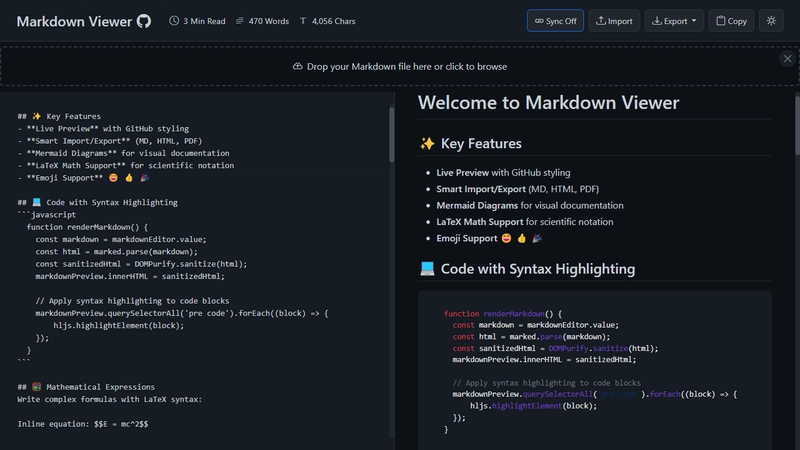
See exactly how your Markdown would look on GitHub. From headings and tables to task lists and emoji shortcodes, the rendering engine closely mirrors GitHub’s own Markdown parser — perfect for developers and open-source contributors.
Live Preview with Sync Scrolling
The dual-pane interface gives you a live HTML preview as you type. And with sync scrolling, your editor and preview stay perfectly aligned — making writing and proofreading incredibly smooth.
Dark Mode Toggle
Whether you’re coding at midnight or just love a sleek interface, the built-in dark mode has you covered. Toggle between light and dark themes anytime with a single click.
Content Statistics
Keep track of your writing with word count, character count, and estimated reading time. Great for content creators, bloggers, and technical writers who want to meet specific writing goals.

LaTeX Math Support
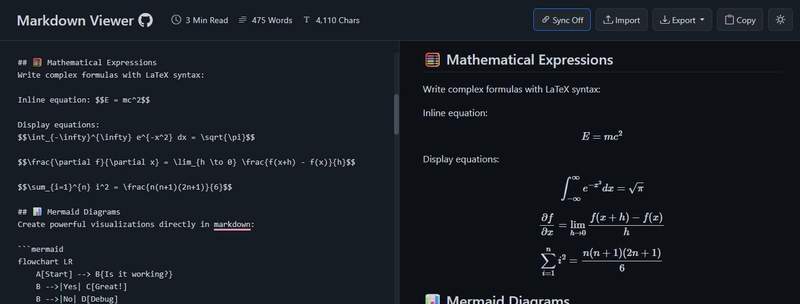
For academics, scientists, and engineers — Markdown Viewer now supports LaTeX-style math expressions using MathJax. Both inline and block-level equations are rendered beautifully.
Inline equation: $$E = mc^2$$

Display equations:
$$\int_{-\infty}^{\infty} e^{-x^2} dx = \sqrt{\pi}$$

$$\frac{\partial f}{\partial x} = \lim_{h \to 0} \frac{f(x+h) - f(x)}{h}$$

$$\sum_{i=1}^{n} i^2 = \frac{n(n+1)(2n+1)}{6}$$
Mermaid Diagrams
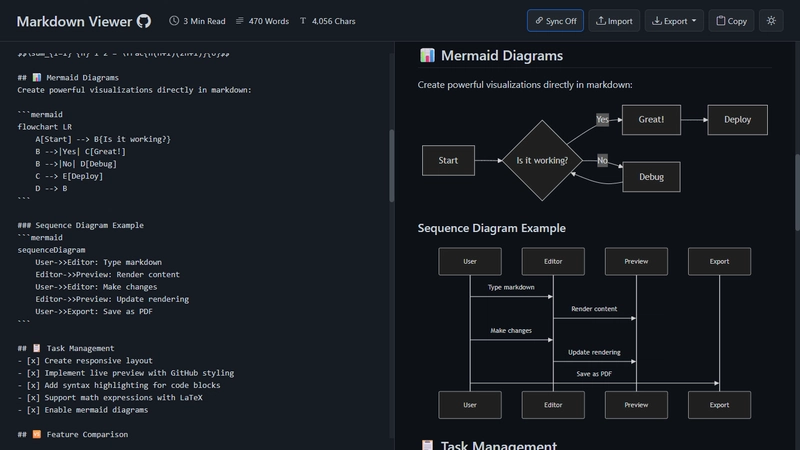
Markdown Viewer integrates Mermaid.js for generating flowcharts, sequence diagrams, Gantt charts, and more — directly inside your Markdown.
flowchart LR
    A[Start] --> B{Is it working?}
    B -->|Yes| C[Great!]
    B -->|No| D[Debug]
    C --> E[Deploy]
    D --> B
Import & Export Options
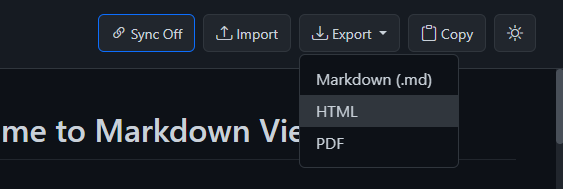
Now you can:
-
Import
.mdfiles via drag & drop or file picker -
Export your content as:
- Markdown (
.md) - HTML (
.html) - PDF (
.pdf)
- Markdown (
It’s fast, secure, and 100% client-side — no data leaves your browser.
Syntax Highlighting for Code Blocks
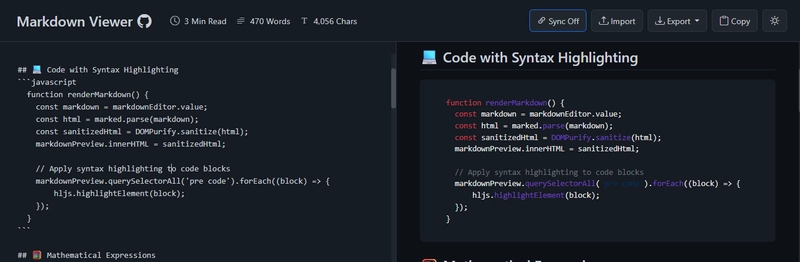
Code blocks are rendered with beautiful, multi-language syntax highlighting powered by highlight.js. Your technical documentation will look as sharp as your code.
  function renderMarkdown() {
    const markdown = markdownEditor.value;
    const html = marked.parse(markdown);
    const sanitizedHtml = DOMPurify.sanitize(html);
    markdownPreview.innerHTML = sanitizedHtml;

    // Apply syntax highlighting to code blocks
    markdownPreview.querySelectorAll('pre code').forEach((block) => {
        hljs.highlightElement(block);
    });
  }
Emoji Support
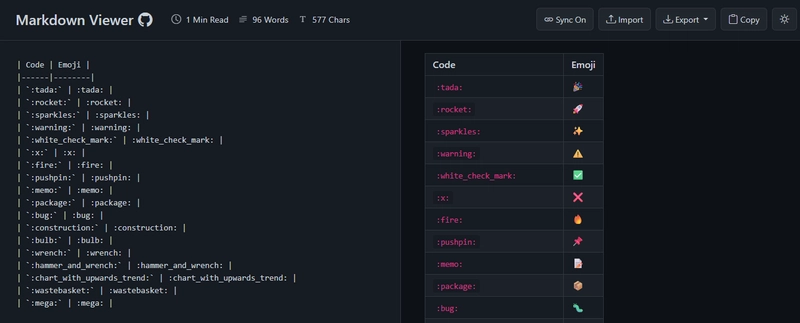
Write with personality! Emoji shortcodes like :sparkles: or :rocket: are automatically converted into visual emojis using JoyPixels.
:sparkles: Welcome to Markdown Viewer! :rocket:
Tech Stack Overview
- Frontend: HTML5, CSS3, JavaScript, Bootstrap
-
Libraries:
-
marked.js- Markdown parsing -
highlight.js- Code syntax highlighting -
MathJax- LaTeX rendering -
Mermaid.js- Diagram rendering -
html2canvas.js+jsPDF- PDF generation -
DOMPurify- HTML sanitization -
JoyPixels- Emoji parsing -
FileSaver.js- File Handling
-
How to Try It Out
Getting started with Markdown Viewer is super simple:
git clone https://github.com/ThisIs-Developer/Markdown-Viewer.git
cd Markdown-Viewer
Then open index.html in your browser — no installation required!
Or skip all that and try the Live Demo now!
A Look Back: The Evolution of Markdown Viewer
From basic previewer to fully-featured editor.
This journey started with a minimal editor. Over time, through iteration, feedback, and a passion for improvement, Markdown Viewer has become a powerful writing and visualization tool.
Compare it yourself:
Current version: markdownviewer.pages.dev
Original version: v1 demo
Final Thoughts
Whether you're a student, developer, blogger, or technical writer, Markdown Viewer v2.0 is built to support your workflow — fast, flexible, and fully featured.